


Mahjong Solitaire - Master
4.62.13K Reviews
App Specs
- Version
- 3.3.4
- Updated On
- License
- Free
- Downloads
- 1,000,000+
- Developer
- Kiwi Fun
- Categories
- Board
- Platform
- Android, iOS
Screenshots
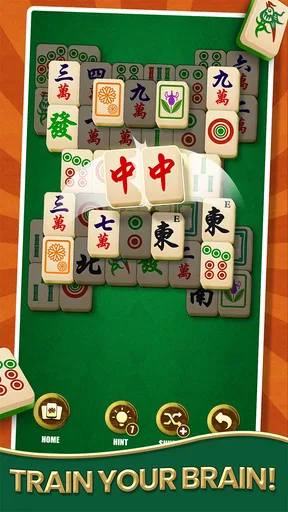
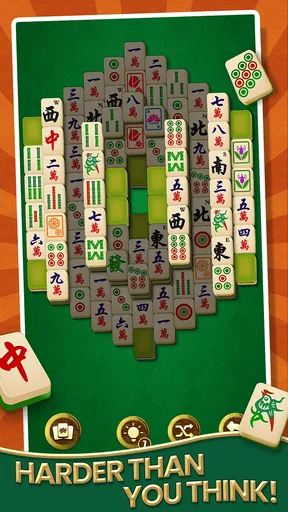
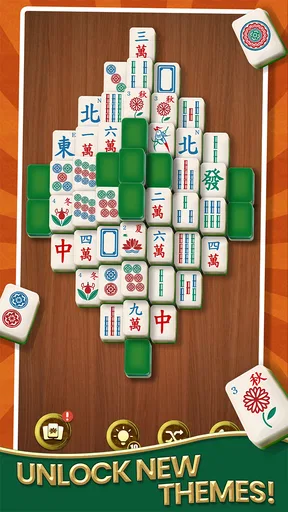
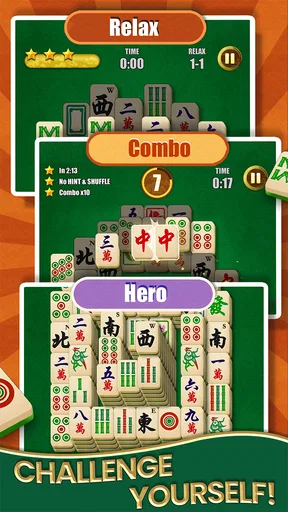
 Analysis by AppCompare
I found Mahjong Solitaire - Master easy to understand within a few minutes, but not so shallow that the first successful board feels automatic. It is a free board puzzle game from Kiwi Fun, built around the familiar Mahjong Solitaire idea of removing matching tiles from a layout. The appeal is simple: I can open it when I have a short break, make a few careful decisions, and stop without needing a long session or a complicated tutorial.
That simplicity is also the most important thing to understand before installing it. This is not a competitive Mahjong table, a multiplayer strategy game, or a traditional four-player Mahjong simulation. It is a solo matching puzzle. If you enjoy spotting pairs, planning around blocked pieces, and clearing a board at your own pace, the format is immediately approachable. If you want deep card-like progression, social play, or a story campaign, this will probably feel too focused.
What to expect from the first board
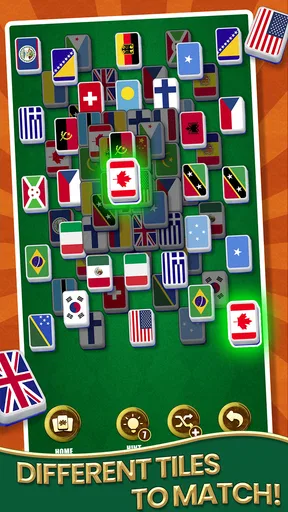
The game belongs to the board-puzzle side of mobile gaming, and its central task is familiar even if you have never played this particular version. Tiles are arranged in a layered formation, and I look for two matching tiles that can be selected. The challenge is not merely recognizing identical symbols; it is choosing which available pair to remove so that useful tiles underneath or behind it become accessible.
That distinction matters during the opening minutes. A quick pair can look attractive, but removing it may expose nothing helpful. Another pair may seem less urgent while actually opening a larger section of the layout. I found that the most satisfying moments came from treating each move as a small planning decision rather than tapping the first match I noticed.
The presentation is designed for casual use. The store classifies it as a board game, and that description fits better than calling it an action title or a traditional Mahjong app. I do not need fast reflexes, a strong internet habit, or prior knowledge of Mahjong rules to understand the basic objective. The experience is mainly about visual attention and keeping track of which tiles are still available.
Its audience is broad as well. The content rating is Everyone, so families and younger players can approach it without the mature themes associated with many other mobile genres. I would still describe it primarily as a quiet solo puzzle for anyone who enjoys concentration. It can be relaxing, but it is not completely passive: a careless selection can leave a board awkwardly arranged and force me to reconsider my approach.
Kiwi Fun has positioned the game as a popular Mahjong Solitaire option, and its reach is reflected by more than a million installs. I would not use popularity alone as a reason to choose it, but it does suggest that the basic format has found a substantial casual audience. The average rating is 4.6 from roughly 136 thousand ratings, which gives a useful indication that many players find the core experience dependable and enjoyable.
Worth Reading Before You Choose

EA SPORTS FC Mobile 26 Is a Bigger Football Game, but It Takes Time

Flipboard Shows What News Apps Must Do Beyond the Feed

Switching to Android Auto Means Rethinking Your Driving Routine

Google Calendar Makes a Crowded Week Easier to Manage

Ludo King Makes the Most of the Minutes Between Plans

Baby Panda World Brings Quick Play to Modern Phones, but Its Game Library Feels Busy
The game is free to install, with optional in-app purchases ranging from $0.99 to $19.99 per item. That makes trying it straightforward, but I recommend deciding early whether you want to play without spending or whether optional purchases are acceptable for your habits. A free download is not the same thing as a completely purchase-free experience, and people who prefer a strictly no-purchase environment should pay attention to the way the app presents its store elements.
Getting comfortable after installation
On Android, the listed minimum requirement is version 7.0, so the compatibility range covers many older devices as well as newer phones and tablets. The current version is 3.3.4. I would still approach the first launch patiently, especially on a smaller screen, because the important adjustment is not technical; it is learning to read the board without accidentally selecting the wrong tile.
My advice is to begin with the device held in the position that gives you the clearest view of the whole layout. On a compact phone, I found it more useful to pause and inspect the upper layers than to zoom through obvious matches. The board is easier to reason about when I can see which tiles are covering others and which edge pieces are actually available.
The first setup question most new players have is whether they need to understand Mahjong itself. They do not. Traditional Mahjong has its own rules, but this solitaire format uses matching and accessibility as its main language. I would not spend time memorizing suits, scoring systems, or table etiquette. Instead, focus on the visual rule: a matching pair is useful only when both pieces can be selected.
A second question is whether the game is suitable for short sessions. In my experience, yes. The board-puzzle structure makes it easy to play for a few minutes during a commute, while waiting for an appointment, or before bed. It also supports a more deliberate session when I want to work through a difficult arrangement. The important trade-off is that a short session can still demand concentration; this is not always a game I can play while giving full attention to another task.
The app was released on May 25, 2021, and its continued presence in the store gives it a more established feel than a brand-new experiment. That does not guarantee that every player will like its presentation, but it does make it easier to regard the game as a stable casual option rather than a temporary novelty.
How I reach the first meaningful success
For a first attempt, I recommend slowing down before removing anything. I scan the board from the outer edges toward the center and identify pairs that are clearly free. Then I ask a more useful question: which pair will uncover the most new choices? This approach helped me avoid wasting an easy match simply because it was visible.
The first meaningful success is not just clearing two tiles. It is opening a section of the layout and seeing the number of available decisions increase. That is the moment the game’s design becomes clear. A good move creates options; a careless move can reduce them. Once I started valuing future access rather than immediate removal, the puzzles felt more deliberate and less like a memory test.
One practical technique is to keep a mental note of pairs that are currently blocked. I do not need to remember every symbol on the board. I only watch for a tile whose matching partner is visible but inaccessible. When another move frees it, I can immediately reassess that pair. This reduces random tapping and is especially useful when several similar-looking pieces are spread across different layers.
Another useful habit is to avoid assuming that the first available pair is the best pair. If two moves appear equally safe, I choose the one that exposes a larger area or removes a tile from a position that is blocking several others. This is a small adjustment, but it makes the early boards feel more manageable and gives me a repeatable method when I get stuck.
When a board becomes confusing, I stop looking at the entire screen and divide it into sections: top layer, side edges, and central stacks. I then search for pairs within those areas before comparing them globally. This is not a special button or hidden mode; it is a way of using the board’s layout more intelligently. It also helps on a phone, where visual clutter can make every tile appear equally important.
For someone introducing the game to a child or an older relative, I would demonstrate the accessibility rule with just one pair rather than explaining the whole board at once. Let the new player select an obvious match, then show how that removal changes the available choices. The immediate cause-and-effect relationship is easier to understand than a long explanation of strategy.
Confusion points that can slow down new players
The most common misunderstanding is treating every matching symbol as immediately usable. In a layered solitaire board, two identical tiles may be present but still unavailable because one is covered or otherwise blocked by the arrangement. If a match does not respond as expected, I first check whether both pieces are genuinely free rather than assuming the game has missed my tap.
Small screens can create a second source of friction. When several tiles sit close together, a tap may feel less precise than it would on a tablet. I found that deliberate taps near the center of the chosen tile work better than quick swipes across a crowded area. If I rush, I spend more time correcting my own selection than solving the puzzle.
Players may also expect the game to behave like traditional Mahjong. That expectation can make the first launch confusing, especially for anyone who arrives looking for a multiplayer table, betting system, or four-seat match. This is a solitaire board puzzle, so its satisfaction comes from clearing a layout alone. That makes it a better fit for independent play, but a worse choice for someone specifically seeking a social Mahjong experience.
Another point worth understanding is the difference between a mistake and a difficult board. Sometimes I have several visible pairs but no obvious route forward. That does not necessarily mean I have played badly. The useful response is to review which earlier move opened or closed access, then look for a pair that changes the structure of the remaining tiles. I get better results by analyzing the last few decisions than by tapping faster.
The game’s free status may also raise a practical question: can I simply play without buying anything? The app can be installed for free, and optional purchases are listed separately, but I would still review any purchase prompt before confirming it. Players who are comfortable with optional spending can treat those items as a convenience; players who want a completely controlled budget should keep purchases disabled through their device settings and play within the free portion of the experience.
There is also a difference between enjoying calm repetition and needing constant novelty. Mahjong Solitaire can be comforting because the rules stay stable while the layouts provide the variation. However, anyone who needs a strong narrative, frequent character interaction, or dramatic changes in gameplay may find the repeated matching structure limited. That is not a flaw in the basic concept, but it is an important preference check before committing time to it.
Using it in an ordinary day
A realistic use case for me is a ten-minute waiting period. I open the game, work through the first visible choices, and stop when I reach a natural pause instead of feeling forced to begin a large campaign. That makes it more convenient than many strategy games that require remembering a story, managing resources, or completing a lengthy mission before I can leave.
It also works well as a screen activity that is more focused than passive scrolling. I have to inspect shapes, hold a few possibilities in mind, and make decisions with a visible consequence. It is not a replacement for a dedicated brain-training program, and I would not claim that a few boards produce a measurable mental benefit. Still, as a simple way to occupy a quiet break, it gives me more involvement than endlessly refreshing a social feed.
For travel, the main attraction is the self-contained nature of the puzzle format. I can play at my own pace rather than waiting for another person to take a turn. On the other hand, anyone who depends on uninterrupted play should remember that mobile conditions vary. I would start a board only when I am comfortable pausing or ending if my attention is needed elsewhere.
It can also suit a shared household device, provided each player is happy with the same solo format. A parent and child could take turns attempting boards, discussing which pair should be removed next. That creates a cooperative conversation without turning the game into multiplayer. The limitation is that the app itself remains a personal puzzle experience, so it will not replace a board game designed around several players sitting together.
Where it stands beside other puzzle choices
Compared with a traditional physical Mahjong set, this app removes the need to arrange, shuffle, and store a large collection of tiles. It is quicker to start and easier to carry. The trade-off is tactile: I do not get the physical feel of picking up and moving pieces, and the experience depends on the phone screen rather than a table shared with other people.
Compared with match-three games, the decision-making feels slower and more spatial. Match-three titles often reward quick pattern recognition and chain reactions, while this game asks me to think about access and order. If I want bright bursts of activity and immediate feedback, a match-three alternative may be more exciting. If I prefer a quieter puzzle where one choice can affect several later choices, this format is more satisfying.
Compared with crossword or word games, the barrier to entry is lower because I do not need vocabulary knowledge. That makes it friendly for players who want a visual challenge. The downside is that it offers less variety in the type of thinking required. A crossword can test language and clues; this game stays focused on matching, visibility, and board management.
Compared with traditional multiplayer Mahjong apps, the choice is even clearer. This solitaire version is better when I want no scheduling, no opponents, and no pressure to understand a full rule set. A multiplayer alternative is better when the social table, competition, and deeper Mahjong rules are the main reason I am interested. Choosing between them depends less on quality than on whether I want a private puzzle or a shared game.
Who should take the next step
I recommend giving it a try if you want a free, approachable board puzzle that can fit into short breaks and still reward careful play. It is particularly suitable for first-time Mahjong Solitaire players because the basic goal becomes understandable quickly, while the layered layouts leave room to improve your decision-making.
I would skip it if you are specifically searching for multiplayer Mahjong, a story-driven adventure, or a game with constant action. I would also be cautious if repetitive matching loses its appeal quickly. The game’s strength is its focused loop, so that same focus can feel narrow to someone who wants several different modes in one app.
My best beginner routine is simple: start with an obvious free pair, pause after each removal, look for the move that opens the most space, and keep blocked matching tiles in mind. Do not judge the whole game by the first few taps. The meaningful improvement comes when you stop chasing easy pairs and begin planning one or two moves ahead.
Kiwi Fun’s game is not trying to reinvent the board-puzzle genre, and I think that is part of its value. It takes a recognizable idea and makes it accessible enough for a first session without removing the small strategic decisions that keep the boards interesting. With an average of about 2.1 thousand written reviews alongside its broad rating base, it has attracted enough player feedback to feel established in its niche.
After spending time with it, my opinion is favorable but specific: this is a dependable choice for calm, solo Mahjong-style puzzle sessions, not an all-purpose game collection. The free entry point makes experimentation easy, the Everyone rating widens its audience, and the current version gives Android users a straightforward way to see whether the format suits them. I would install it when I want a focused break, then play slowly enough to make each cleared pair feel earned.
Pros
- Easy-to-learn matching rules suit both beginners and casual players.
- Short rounds make it convenient for quick breaks or daily play.
- Large tile designs improve readability on smaller phone screens.
- Progressive layouts offer a relaxing challenge without requiring fast reflexes.
- Offline play is useful when traveling or away from a stable connection.
Cons
- Some advanced layouts may feel repetitive after extended play sessions.
- Undo or hint features may reduce the challenge for experienced players.
- Tile visibility can become difficult on compact screens during busy layouts.
- Optional ads may interrupt the flow between puzzles or after completed rounds.
- Players seeking competitive multiplayer may find the solo format limited.
FAQs for Mahjong Solitaire - Master
What is Mahjong Solitaire - Master, and how is it played?
Mahjong Solitaire - Master is a tile-matching puzzle game based on the classic solitaire version of Mahjong. The objective is to clear the board by matching two identical, free tiles at a time. Tiles can only be selected when they are not covered and have at least one open side. As you progress, layouts become more complex and require careful planning rather than simply matching the first pair you see.
Does Mahjong Solitaire - Master work without an internet connection?
The main puzzle experience can generally be enjoyed offline, which makes the game convenient for travel, commuting, or playing in places with limited connectivity. However, some features may depend on an internet connection, including advertisements, cloud-related services, updates, leaderboards, or optional rewards. Before downloading, players should also check the app-store listing because offline availability and online requirements can change with future versions.
Is Mahjong Solitaire - Master free to download and play?
Mahjong Solitaire - Master is typically available as a free download, allowing players to start solving boards without paying an upfront purchase price. Free access may be supported by advertisements, and some versions can include optional in-app purchases, such as removing ads, obtaining hints, or unlocking extra content. Review the store page carefully to confirm the current pricing, advertising model, and available purchases for your device.
Are hints, shuffles, or other assistance tools available?
The game is designed to provide a relaxing puzzle experience, and assistance features may be available when a board becomes difficult. Depending on the version, these can include hints that highlight a possible match, shuffle tools that rearrange remaining tiles, or undo options that let you correct a move. Such tools may be limited, earned through gameplay, or connected to optional purchases, so they should be used strategically.
Is Mahjong Solitaire - Master suitable for beginners and younger players?
Mahjong Solitaire - Master is approachable for beginners because its basic rule is easy to understand: find and remove matching, accessible tiles. At the same time, later layouts can challenge experienced players with limited moves and more complicated arrangements. It is generally suitable for casual audiences, but parents should check the current age rating, advertising content, and privacy information before allowing children to play, particularly if in-app purchases are enabled.


